
How To Add Share Button To A Site
In This Article we will discuss that How to add Social Media Share Button To Website Free, so let's Start our Article.First of all Go to your Search Client i.e Chrome,Mozila,Firfox,IE etc and Search ' SeoButtons.com' and Open it...
you will see Some part of window like in this image....
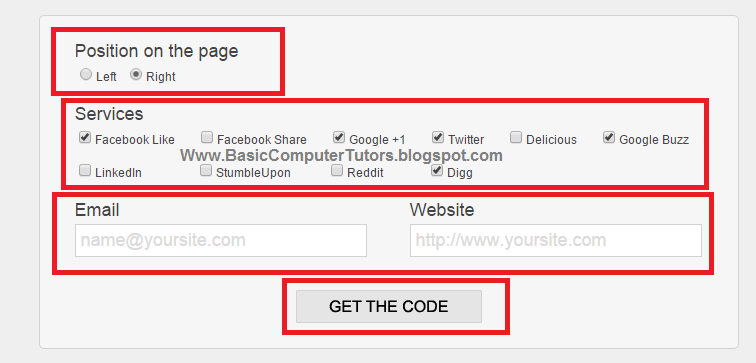
When this window Opened See in the window, there will be some options.
Position on the page : -
Position on the page is a position which your share button will show there..
i.e when you click on Left option after your Social bar will be show on Left side of your Website, if you click on Right your Social Bar will be show on Right Side of your Website.
Service : -
In this Option have some Social media options which you can add or Delete some Shares buttons from your Share Bar. If you want to add Facebook Share Button to your Site then Click on ' Facebook Share Button ' after Clicking when you put it's Codes on your Website <Body> Content ' Facebook Share button ' will be show there.
And
* Website
Email And Website is important/ Required for making Social Share Bar for your Site, Email is very helpful for you if you want to update your Social bar again after few Month or few Years.
After Completing that Field Click On the ' Get Code ' you will find your Social bar codes in another window See example in the image.

Copy it and Go to Your Blogger , Wordpress, Html etc and Paste it's Codes before the End of </Body> Tag.
i.e. for Blogger
Open Blogger >> >Goto Blogger Dashboard
>>>Go to your Site's Template
>>> Click on Edit Template | and Find </Body> Tag // Tip(Ctrl+F , write </Body> and click enter )
* Now paste your Social Bar Codes before the End of </body> Tag. After Adding Codes Refresh your Website and you will be seeing your Share Bar Button at the side bar of your Site.
Was this Article is Helpful? Share it to your Friends!
